
Also known as: adding a director's or PSC's personal identity verification code, or "passcode".
Since 18 November 2025, every director and PSC must verify their identity with Companies House and have a personal code. These codes need to be recorded in Inform Direct.
Secretaries can receive a personal code from Companies House, however, as there is no way of reporting this to Companies House. It is not possible to add the personal codes for secretaries on Inform Direct at this time.
For further details on the checks required, please see our blog: Identity verification of directors and PSCs
Select the Officers or PSCs tab and locate the individual required, click the yellow pencil and Edit Personal Details.
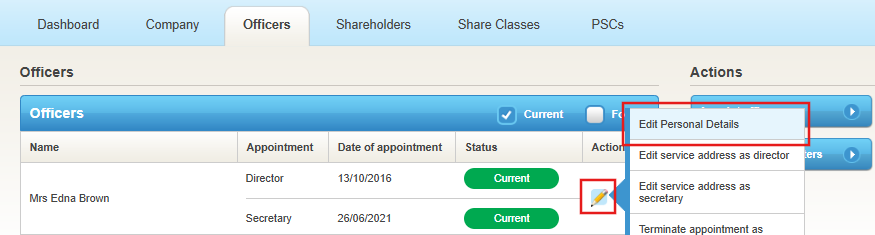
The edit area contains a Companies House personal code field.
A Date of change will be required, but this is not used in relation to any other updates, so any valid date can be entered.
Important: If the CS01 made up to date has passed (typically 14 days before the confirmation statement is due), you cannot make changes to director or PSC details after this date. To make changes, you must first file the confirmation statement and then update the records.
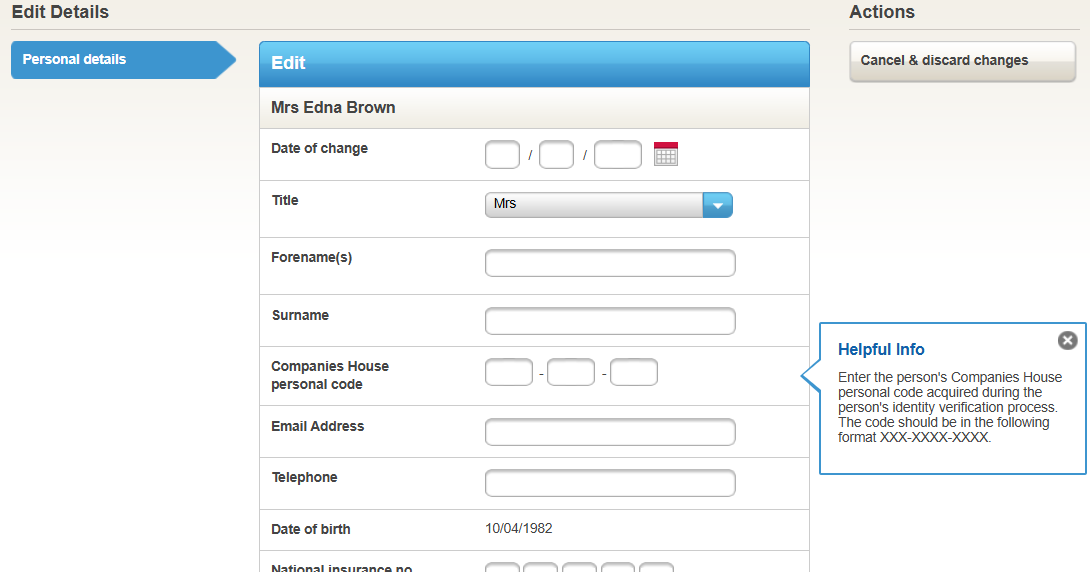
At the bottom of the page, select Continue to save the details.
Inform Direct will look to locate other directors/PSCs in the portfolio with an identical name and will ask whether the code should apply for these records too, allowing you to update in bulk for the individual.
How to Obtain a PSC or Director Personal Code
- Personal codes are supplied by Companies House to individual directors and PSCs.
- To obtain your personal code, visit the Companies House "Sign in" portal at https://www.gov.uk/guidance/verify-your-identity-with-companies-house and follow the ID verification process.
- Once you have completed verification, your personal code will be shown on screen and emailed to you by Companies House.
- If you cannot find your code, you can log into your Companies House account (also known as Gov One) at any time to view or retrieve your personal code.
Please note: Inform Direct cannot check the correctness of a personal code. It will only be confirmed once you have submitted the relevant filing (such as a CS01 or VS01) and Companies House has accepted the update. Entering a personal code alone does not guarantee its validity.
If the Companies House personal code field isn't showing at all:
This is usually a user permissions issue rather than a missing feature — personal codes are only visible to practitioner and manager users once an admin has enabled this in Manage Users. Ask an admin on your account to check your permissions. See Personal codes censored or unviewable.
Checking codes across all of your clients? If you need to check which personal codes are missing across your whole portfolio (all client companies) rather than one record at a time, see How to generate a report of personal codes entered.
My confirmation statement said no personal codes were required — is that right?
Directors only submit their personal code on the first CS01 filed after November 2025. If Inform Direct is showing that none are due, that reflects what Companies House itself is stating for this filing — it isn't a fault. You can confirm this independently by checking the Officers tab for your company on the Companies House website: any director who has already been verified will show as such there.
What do "provided" and "not required" mean next to a director's personal code in the confirmation statement?
Provided means a personal code has been entered for that director. Not required means the director has already been verified outside of this confirmation statement, so there is nothing further to send. This is the case if a confirmation statement has already been filed since November 2025, or if the director was appointed after November 2025. Neither status is a fault.
How do I know if a director or PSC has completed identity verification?
For directors: Inform Direct shows whether their Companies House personal code has been entered. If the company has already filed a CS01 since November 2025, you can be confident its directors are verified — Companies House won't accept that filing otherwise.
For PSCs, it's more visible directly on the PSC tab: a PSC who's completed verification won't show a due date next to their name, whereas one who hasn't will.
Can I record a preferred or "known as" name for a director or PSC? There is no separate preferred name field. If you know the person's registered name doesn't match their legal name, enter a Name mismatch reason alongside the personal code and record that it is their preferred name. This is used only for personal code verification and has no other purpose in Inform Direct.
A director's name has changed since their personal code was issued (for example after marriage) — why do I get a name mismatch, and what do I do?
A personal code is linked to the name the person verified under, so if the name on the officer record is now different, it won't match. There are two ways to resolve it:
- Keep the existing personal code and enter a Name mismatch reason alongside it (in Edit Personal Details). This is reported to Companies House alongside the verification statement.
- Have the director verify their identity again under their new name with Companies House, then enter the new personal code they are issued.
The "Override failed identity check result" option is a separate feature: it only appears where a Bright Checks identity check carried out in Inform Direct has failed, so you won't see it if the personal code was obtained directly from Companies House.
I've imported a company whose directors already have personal codes recorded in my other companies — will Inform Direct apply them automatically?
No. Personal codes are not carried across when a company is imported, so you will need to enter the code on each imported director and PSC. When you enter a code, Inform Direct will look for people with an identical name in your other companies and ask whether the code should apply to those records too, so you can update them in bulk.
I can't enter or save a personal code for a director or PSC. What is stopping me?
Open the Officers or PSCs tab, click the yellow pencil next to the individual and choose Edit Personal Details. The personal code is entered in the Companies House personal code field. If it won't save, the usual causes are:
- A confirmation statement, or another change of details for that individual, is still pending. Wait until it has been accepted by Companies House, then add the code.
- The Date of change entered isn't eligible. It can't be before the person's appointment date, or after the made up to date of an overdue confirmation statement.
If the field isn't showing at all, see the permissions section above.
I get the error "Date of change cannot be on or before the pending … date" when saving a personal code. What date should I use?
This message means the date you entered isn't eligible, usually because something is pending for that person. Check which of these applies:
- A confirmation statement or other change of details is pending. Wait until Companies House has accepted it, then add the code.
- The confirmation statement is overdue. Use a Date of change that is on or after the person's appointment date and not after the made up to date of the overdue confirmation statement. You do not need to use the due date or the date the confirmation statement was submitted.
If the code still won't save, it can't be saved without a Date of change, so check the date against the two points above.
Also known as: director got married and changed name, married name personal code mismatch, name changed after ID verification, verified under old name, maiden name personal code, personal code under previous name, name on personal code doesn't match Companies House, ID verification name mismatch, how do I override a name mismatch, no override option showing, imported company personal codes not showing, are personal codes copied when importing a company, will existing personal codes carry over to a new import, personal code already entered on another client company, apply personal code to all companies for the same director, not able to put in a PSC code, can't add personal code, personal code won't save, can't enter director code, where do I add the PSC code, personal code provided, personal code not required, what does not required mean on the confirmation statement, date of change cannot be on or before the pending date, date of change error personal code, PSC date of change won't accept the date, unable to save without a date.