
A Standard Industrial Classification code (or SIC) describes the main business activity of a company. A company can have up to 4 codes at any time.
The only way to update the SIC code stored at Companies House is by filing a Confirmation Statement.
You can update the stored SIC code on Inform Direct and then file the Confirmation Statement to report this to Companies House.
How Do I File a Confirmation Statement? (CS01)
Why Might I File a Confirmation Statement Early?
Changing or adding a new SIC code using Inform Direct is easy.
What SIC Codes are available for use?
1. Go to the Company tab and select 'Edit Company Information'.
2. In Trade Classification #1, start writing a word that best describes your business.
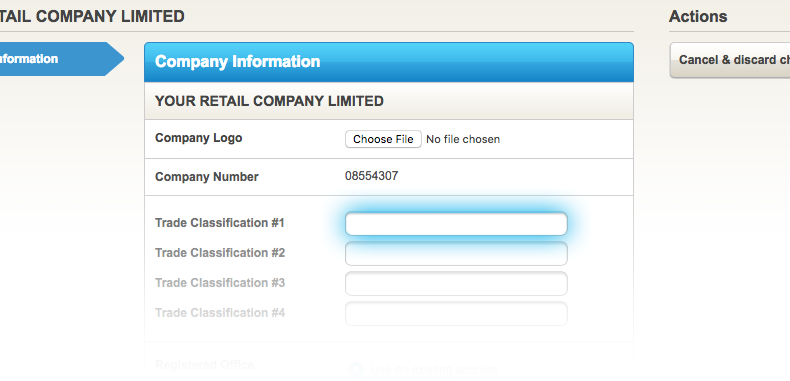
3. Possible options will then start being displayed.
Note: If your company is dormant start typing "dormant," and that option will be presented.
4. Click on the description(s) that best fits the company. You need to click on the suggestion and let Inform Direct populate the field for you. Do not just type the 5 digit number. Always ensure the SIC code matches the UK Companies House list: https://resources.companieshouse.gov.uk/sic/
5. If you need to update a SIC code, just repeat the above steps. You can also delete any codes that are no longer applicable.
6. When complete, click on the green 'Save changes to details' button.
Note: The updated SIC code will only be reported to Companies House in the next confirmation statement.
Note: There won't always be a SIC code that's an exact match for what your company does — experiment with keywords to find the code that best describes your company's activities, and select up to 4 if needed. That said, under the Economic Crime and Corporate Transparency Act, Companies House now has stronger powers to challenge, reject or remove SIC code information that looks incorrect or inconsistent — most commonly where a company still shows a dormant or non-trading code after it's started trading. So while there's no need to worry about a good-faith, reasonably close match, do make sure your code reflects what your company actually does, and update it if that changes. See How Do I Choose the Right SIC Code for My Company? for more.
Does this process work the same for LLPs? Yes — this process is identical for Limited Liability Partnerships (LLPs). Simply follow the same steps above to update or add a SIC code for an LLP.